Quick Answer: Windows or Linux Dedicated Server?
The answer to the big question “Windows vs linux dedicated server” is simple. If the stack you are using relies on Microsoft technologies like ASP.NET, MSSQL, Exchange, or Windows-only enterprise apps, a Windows dedicated server is the right pick. It gives you native compatibility, RDP-based administration, and vendor-supported configurations.
On the other hand, if you run LAMP/LEMP, Node, Python, PHP, Docker, or open-source CMS and SaaS stacks, a Linux dedicated server is the best option. It delivers more performance per penny, lower licensing costs, and greater automation flexibility.
| Pick Windows if: | Pick Linux if: |
| You depend on .NET Framework, MSSQL, or Windows-specific software. | Your workloads are web-first, API-driven, or containerized. |
| Your team is comfortable with RDP and Windows Server administration. | You want maximum control, lower TCO, and strong DevOps tooling. |
What Is a Windows Dedicated Server?
For a long time, I treated “dedicated server” as one generic idea. It took me a while to realize how much the operating system changes the picture. It’s important to figure out the “Windows vs linux dedicated server” scenario.
A Windows dedicated server is a physical machine you rent from a hosting provider that runs Windows Server exclusively for your workloads. You get the entire CPU, RAM, and storage to yourself. There’s no sharing with other customers.

In my work with Indian SMBs and agencies, these servers usually come with Windows Server 2019 or 2022. They support Remote Desktop (RDP) so you can manage them like a normal Windows PC. These often include panels like Plesk for sites, databases, and email.
Their plans cost more than similar Linux setups just because Microsoft charges for Windows Server licensing. But if your applications depend on ASP.NET, MSSQL, Exchange, SharePoint, or other Windows-only software, a Windows dedicated server removes all compatibility headaches.
If your team already manages Windows environments or your vendors demand Windows Server for support, go for this option. It reduces risk and simplifies troubleshooting while giving you the dedicated performance that revenue-critical apps need.
What Is a Linux Dedicated Server?
I used to think “dedicated server” meant one thing. Then I started deploying real projects and saw how much the OS changes everything.
A Linux dedicated server is a physical machine you rent that runs a Linux distribution just for your workloads. You get the entire CPU, RAM, and storage to yourself. Forget noisy neighbors and shared resources.
In my work with Indian SMBs and agencies, these servers usually run Ubuntu, Debian, or Rocky/Alma. They are managed over SSH, and often use panels like cPanel/WHM, Plesk, or DirectAdmin to simplify sites, databases, and email.
As most Linux distros are free, you skip Windows-style licensing and pay mostly for hardware, support, and optional panels. If you run LAMP/LEMP, Node.js, Python, PHP, MySQL/PostgreSQL, Docker, or Kubernetes, this setup fits naturally. For teams comfortable with Linux or wanting maximum performance per rupee, strong automation, and lower total cost, a Linux dedicated server delivers the control and reliability that revenue-critical web apps need.
That’s important when we are trying to find the right option through “Windows vs linux dedicated server” compraison.
Windows vs Linux Dedicated Server: Key Differences
After deploying both Windows and Linux dedicated servers for different clients, the differences become very clear once you move beyond marketing specs. This actually clears the Windows vs linux dedicated server scenario.
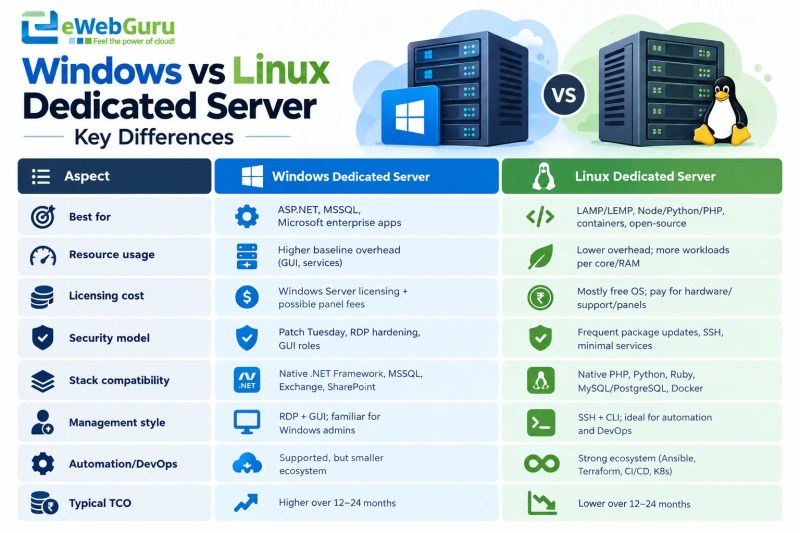
Before diving into details, here’s a quick overview of how Windows and Linux dedicated servers differ across the factors that matter most.
| Aspect | Windows Dedicated Server | Linux Dedicated Server |
| Best for | ASP.NET, MSSQL, Microsoft enterprise apps | LAMP/LEMP, Node/Python/PHP, containers, open-source |
| Resource usage | Higher baseline overhead (GUI, services) | Lower overhead; more workloads per core/RAM |
| Licensing cost | Windows Server licensing + possible panel fees | Mostly free OS; pay for hardware/support/panels |
| Security model | Patch Tuesday, RDP hardening, GUI roles | Frequent package updates, SSH, minimal services |
| Stack compatibility | Native .NET Framework, MSSQL, Exchange, SharePoint | Native PHP, Python, Ruby, MySQL/PostgreSQL, Docker |
| Management style | RDP + GUI; familiar for Windows admins | SSH + CLI; ideal for automation and DevOps |
| Automation/DevOps | Supported, but smaller ecosystem | Strong ecosystem (Ansible, Terraform, CI/CD, K8s) |
Here’s how they actually compare in real-world use.
Performance and Resource Usage
Linux generally uses resources more efficiently than Windows. Without a heavy GUI by default, a Linux dedicated server can run more web processes, databases, and background jobs on the same CPU and RAM.
In my tests with similar hardware, Linux often handles higher concurrent traffic for PHP/Node/Python stacks. Windows Server, especially with RDP and GUI components, carries more baseline overhead.
That doesn’t make it slow. Modern Windows Server runs well, but for pure web throughput per core, Linux usually has the edge.
Expert insight: Industry analyses and cloud provider documentation consistently show Linux powering the majority of cloud and container workloads due to its efficiency and flexibility. For example, major cloud platforms report that most VM and container instances in their environments run Linux-based images AWS EC2 Linux guidance.
Choosing the right CPU generation and core count matters as much as the OS that’s why I’ve outlined a step-by-step approach to choosing CPU cores for a dedicated server.
Cost and Licensing
Cost is where the gap widens. Linux distributions are mostly free, so you pay for hardware, bandwidth, and support. Windows Server requires licensing, often per core or per server, which raises the monthly price noticeably.
Microsoft’s own licensing guides make it clear that Windows Server costs scale with core count and edition, directly impacting TCO. Control panels add another layer: cPanel/WHM or Plesk on Linux have their own fees, but Windows setups may combine OS licensing plus panel costs.
Over 12–24 months, a Linux dedicated server typically has a lower total cost of ownership, especially for agencies running many sites or SaaS products.
Expert insight: Microsoft’s official Windows Server product pages and licensing summaries make it clear that costs scale with core count and edition, directly impacting TCO for dedicated deployments of Microsoft Windows Server.
Security and Maintenance
Both OSes can be secured well, but their models differ. Linux tends to have faster, more frequent package updates and a smaller default attack surface when configured headless.
Hardening usually involves SSH key-only access, firewalls, and minimal services. Windows Server relies on regular Patch Tuesday updates, RDP hardening, and careful management of GUI services and roles.
In practice, I see more misconfigured Windows boxes exposed via RDP than properly hardened Linux servers over SSH. OWASP’s guidance on server hardening emphasizes minimizing exposed services and keeping systems patched, principles that apply to both, but are easier to enforce by default on many Linux setups.
Expert insight: OWASP’s Web Security Testing Guide and Application Security Verification Standard (ASVS) outline configuration and deployment management controls that align closely with typical Linux hardening practices OWASP WSTG – Configuration Testing.
Your team’s familiarity matters more than the OS itself.
Software and Stack Compatibility
This is often the deciding factor. If your apps use ASP.NET Framework, MSSQL, Exchange, or Windows-only ERP/CRM tools, Windows dedicated servers are the natural fit.
Many enterprise vendors also require Windows Server for support. For LAMP/LEMP, Node, Python, Ruby, MySQL/PostgreSQL, Docker, Kubernetes, and most open-source CMS (WordPress, WooCommerce, Magento), Linux is native and better documented.
The Cloud Native Computing Foundation reports that the vast majority of containerized workloads run on Linux, reflecting the ecosystem’s bias. Some stacks like .NET Core run on both, but ecosystem support and community examples still lean heavily toward Linux.
Expert insight: CNCF’s annual surveys and ecosystem reports consistently highlight Linux as the dominant OS for containers and cloud-native applications, which reinforces its suitability for modern DevOps and microservices stacks CNCF – About Cloud Native.
Administration and Usability
Windows feels familiar if your team uses RDP and GUI tools; you can manage it like a normal Windows PC. Linux is CLI-first, which can intimidate beginners but shines for automation, scripting, and DevOps.
With Linux, tools like Ansible, Terraform, and CI/CD pipelines integrate smoothly. Windows supports automation too, but the ecosystem and hosting community are more Linux-centric.
As many DevOps leaders put it,
“If you can’t script it, you can’t scale it”
That’s a mindset which aligns more naturally with Linux. If you value graphical management and have Windows admin skills, Windows is comfortable.
If you want scriptable, repeatable infrastructure, Linux is usually the better long-term choice.
Use-Case Scenarios: When to Choose Windows Dedicated Server
My experience advising Indian enterprises and product companies says that Windows dedicated servers are the right choice when your applications depend on Microsoft technologies.
They’re essential for ASP.NET Framework, MSSQL, Microsoft Exchange, SharePoint, or Windows-only ERP/CRM tools that won’t run natively on Linux. Organizations with existing Windows admin teams find RDP-based management familiar and efficient, reducing operational friction.
Vendors often mandate Windows Server for support, making it the compliant option for regulated industries.
As I frequently advise:
“If your core business apps are built on the Microsoft stack, a Windows dedicated server removes compatibility risks and simplifies vendor support.”
For revenue-critical workloads requiring native Windows integration, enterprise licensing, or specific Microsoft certifications, a Windows dedicated server provides the stability, support, and performance needed without costly workarounds or migration overhead.
Use-Case Scenarios: When to Choose a Linux Dedicated Server
In my experience while working with Indian SMBs, agencies, and SaaS founders, Linux dedicated servers consistently outperform VPS for high-traffic, revenue-critical workloads. They’re ideal for LAMP/LEMP stacks, Node.js, Python, PHP, MySQL/PostgreSQL, Docker, and Kubernetes-based applications.
If you run WordPress, WooCommerce, Magento, or custom APIs at scale, Linux gives you better performance for every penny and stronger automation options.
Agencies managing more than 30 client sites grab this benefit from consolidating onto a single inexpensive dedicated server with isolated containers, reducing per-site cost and simplifying backups. I’ve covered similar scenarios, including WooCommerce stores, SaaS apps, and multi-client setups in our post on cheap dedicated server hosting real use cases.
Startups running background workers, queues, and microservices gain predictable latency and easier capacity planning.
As the founder of eWebGuru web hosting, I often tell clients:
“If your stack is open-source and your growth depends on automation, Linux dedicated hosting is the safest, most cost-effective foundation.”
For teams comfortable with SSH and modern DevOps tooling, Linux delivers the control, scalability, and lower TCO needed for modern web applications.
Migration and Flexibility: Can You Switch Later?
Many clients ask if they can migrate between Windows and Linux dedicated servers later. The simple and short answer is “yes”, but it’s an application-level migration, not a simple OS swap.
Moving from Windows to Linux (or vice versa) typically requires re-architecting parts of your stack, including database exports, code adjustments, and configuration changes.

In my experience, migrations are feasible but time-consuming and risky for revenue-critical apps.
For example, shifting ASP.NET Framework apps to Linux often means rewriting for .NET Core or containerizing workloads. Conversely, moving LAMP apps to Windows introduces licensing costs without performance gains.
As I used to tell founders:
“Choose the right OS upfront based on your stack; treat migration as a planned project, not a quick fix.”
If you anticipate major stack changes within 12–18 months, design for portability early. Use containers, abstract databases, and document configurations. This is especially important if you plan to move into AI or heavy-compute workloads that might later require GPU dedicated servers.
This reduces downtime and cost when you eventually switch, ensuring your infrastructure evolves with your business without disrupting revenue.
How to Decide: A Practical Checklist
To cut through the noise, I use a simple checklist with clients before they commit to Windows or Linux dedicated servers. Score each factor from 1 to 5 based on your situation. The higher scores indicate stronger alignment.
- Current and future tech stack: Do you rely on ASP.NET/MSSQL (Windows) or LAMP/Node/Python/containers (Linux)?
- Team skills: Does your team have Windows admin expertise or Linux/DevOps experience?
- Budget and TCO: Are you optimizing for the lowest upfront cost (Linux) or accepting higher licensing for Microsoft compatibility (Windows)?
- Compliance and vendor requirements: Do vendors or auditors mandate Windows Server for support or certifications?
- Growth plans: Will your workload grow 2x to 3x in 12 to 18 months, requiring automation and scalable infrastructure?
- Automation and DevOps: Do you need CI/CD, infrastructure-as-code, and container orchestration (Linux-friendly)?
Add up your scores separately for Windows and Linux. The higher total usually points to the better fit.
In my consulting practice, I’ve seen companies save 20 to 30% annually by matching OS choice to actual stack and skills instead of defaulting to what’s familiar.
As the owner of a reputed hosting company, I often say: “Your server OS should enable your roadmap, not constrain it. Choose the platform that scales with your team and applications.”
This checklist turns a subjective debate into a data-driven decision, reducing migration risks and unnecessary costs down the line.
Frequently Asked Questions:
Is Windows or Linux better for a dedicated server?
It depends on your stack. Windows is better for ASP.NET, MSSQL, and Microsoft enterprise apps. Linux is better for LAMP/LEMP, Node/Python/PHP, containers, and open-source stacks.
Is a Windows dedicated server more expensive than Linux?
Yes. A Windows Server license increases monthly costs, while most Linux distributions are free. Over 12–24 months, Linux typically has a lower total cost of ownership.
Can I run WordPress on a Windows dedicated server?
Yes, WordPress runs on Windows with IIS and PHP, but it’s more common and better optimized on Linux with Apache/Nginx. Most WordPress hosting ecosystems assume Linux.
Which is more secure: Windows or Linux dedicated server?
Both can be secured well. Linux often has a smaller default attack surface and faster patch cycles. Windows requires careful RDP hardening and regular Patch Tuesday updates.
Can I switch from Windows to a Linux dedicated server later?
Yes, but it’s an application-level migration involving code, database, and configuration changes. Plan it as a project, not a quick OS swap.
Which OS is better for game servers or specific apps?
It varies by application. Many game servers run on Linux for performance and cost, but some require Windows. Always check the official requirements for your specific software.
About The Author